How much does Google Ads cost? The bids for 29 searches
In short. Google Ads has no price list. A year of Keyword Planner top of page bids for 29 common small-business searches in the US, and what they do and do not tell you, with a CSV to download.
By Augusta Bhardwaj, who built Admiral and runs the audits on real accounts. A year of Keyword Planner bids.

The short answer
Google Ads has no price list. You pay for a click, and the price of that click is set in an auction every time someone searches. For 29 common small-business searches in the United States over the past year, the top of page bids Google reports ran from about $0.55 at the low end, for “hair salon near me”, to about $291 at the high end, for “personal injury lawyer”. What an advertiser actually pays for a click is often less than their bid.
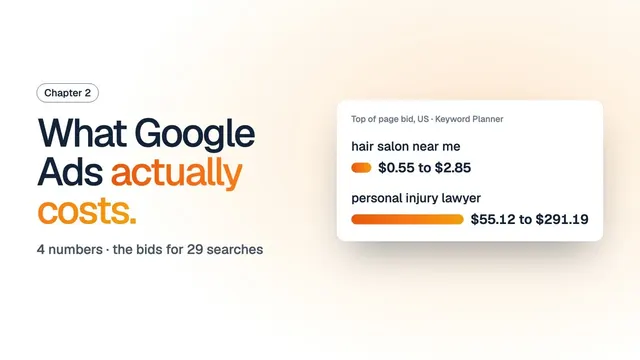 Watch the filmWhat Google Ads actually costs: chapter 2 of the course, as a film
What was measured
30 searches, three in each of 10 kinds of local business, from Google Keyword Planner’s historical data: United States, Google Search, English, the twelve months from September 2025 to August 2026. For each one, Keyword Planner reports a top of page bid range: roughly the 20th and the 80th percentile of the bids advertisers have placed to show at the top of the page for that search. 29 of the 30 came back with bids.
Keyword Planner reports bids in the currency of the account that asks, and ours bills in rupees. The dollar figures here are converted at 95.82 rupees to the dollar, the European Central Bank reference rate for 25 September 2026. The download carries both. Keyword Planner returned no data for “emergency dentist”, so it is shown as missing, not as zero.
Top of page bids, by search
| Search | Searches a month | Top of page bid |
|---|---|---|
| Plumbing | ||
| emergency plumber | 74,000 | $25 to $114 |
| plumber near me | 823,000 | $12 to $82 |
| plumbing services | 49,500 | $14 to $90 |
| Dentistry | ||
| dentist near me | 1,830,000 | $4.70 to $22 |
| emergency dentist | no data | no data |
| teeth whitening | 165,000 | $2.24 to $6.97 |
| Law | ||
| criminal defense lawyer | 135,000 | $7.34 to $76 |
| divorce lawyer | 246,000 | $4.83 to $37 |
| personal injury lawyer | 201,000 | $55 to $291 |
| Roofing | ||
| roof repair | 74,000 | $15 to $69 |
| roof replacement | 33,100 | $15 to $73 |
| roofing contractor | 135,000 | $12 to $60 |
| Heating and cooling | ||
| ac repair | 368,000 | $16 to $100 |
| furnace repair | 201,000 | $11 to $69 |
| hvac repair | 74,000 | $18 to $98 |
| Real estate | ||
| real estate agent | 201,000 | $3.61 to $18 |
| realtor near me | 90,500 | $3.70 to $18 |
| sell my house fast | 9,900 | $15 to $106 |
| Fitness | ||
| gym near me | 1,830,000 | $1.67 to $6.14 |
| personal trainer | 74,000 | $2.50 to $11 |
| yoga classes | 74,000 | $1.78 to $5.13 |
| Hair and beauty | ||
| barber shop | 673,000 | $0.70 to $3.18 |
| hair salon near me | 1,500,000 | $0.55 to $2.85 |
| nail salon | 1,000,000 | $0.61 to $2.10 |
| Accounting | ||
| accountant near me | 33,100 | $5.23 to $28 |
| bookkeeping services | 18,100 | $11 to $52 |
| tax preparation | 74,000 | $3.25 to $17 |
| Moving | ||
| local movers | 60,500 | $5.76 to $31 |
| movers near me | 301,000 | $8.23 to $37 |
| moving company | 201,000 | $12 to $43 |
What sets the price
Google decides whether and where an ad shows by its Ad Rank, which weighs your bid, the quality of your ad and your landing page, the thresholds an ad has to clear, how competitive the auction is, the context of the search, and the expected effect of your ad’s extra assets. Your bid is the most you are willing to pay for a click, and what you pay is often less. Google also says that higher quality ads can often cost less per click.
Location matters too: the ranges above are for the whole of the United States, and Keyword Planner’s estimates depend on the location and network settings you ask about. A city, a state or a different country can price the same search differently.
What this does not tell you
These are bids to show at the top of the page, not prices paid per click, and not what you will pay. They say nothing about what a lead or a customer will cost you: that depends on your page, your offer and how many of the people who click go on to get in touch. What it costs to have someone run the account is a separate question, covered by Google Ads management and what management costs in India.
Use the data
Every row is in the download, with the rupee figures Keyword Planner returned, the converted dollar figures, the rate and its date. Download the CSV.
It is free to use. If you cite it: Augusta Bhardwaj, “How much does Google Ads cost? The bids for 29 searches”, Admiral, 27 September 2026, https://meetadmiral.com/blog/how-much-does-google-ads-cost.
The film, as text
Chapter 2 of the course, word for word, as it is spoken in the film above.
Google Ads has no price list. You pay for clicks, and the price of each click is set in an auction, every time someone searches. In this chapter, we follow one click from the search to your bill, and stop on the four numbers that decide what you pay. Your bid. What a click actually costs. Your daily budget. And when Google charges you.
This is chapter two of a free course on running Google Ads yourself. Chapter one built the campaign. This one is about the money. Every rule here is quoted from Google's own help pages, and every price comes from Google's Keyword Planner.
Step one. How you pay. A Search campaign can be paid by the click. In Google's words, cost per click bidding means that you pay for each click on your ads. Someone sees your ad and scrolls past. That costs nothing. Someone clicks. That's the charge.
Step two. The auction. Google runs one every time someone searches on Google, or visits a site that shows ads. It decides which ads appear, and in what order, from six factors. Your bid. The quality of your ads and landing page. Your Ad Rank thresholds. How competitive the auction is. The context of your ad. And the expected impact of your ad assets. Google's name for the result is Ad Rank: the values that decide whether your ad is eligible to show. So your bid is one factor of six. The quality of your ad and your page sits right beside it.
Step three, and the first number. Your bid. Your bid is a ceiling. Google's words: the maximum amount you're willing to pay for a click on your ad. And a click won't cost you more than the maximum bid you set. If you pick an automated strategy like Target CPC, Google Ads sets your bids for you, to try to hit the average cost per click you asked for.
Step four, and the second number. What a click actually costs. Google calls it the actual cost per click: the final amount you're charged for a click. And it's often lower than your bid. In Google's words, you're often charged less, sometimes much less, than your maximum bid. In your account, the column to read is Avg. CPC: the total cost of your clicks, divided by the number of clicks. Quality moves this number too. Google says higher quality ads can often lead to lower costs per click. There's a score for it, Quality Score, from one to ten, on each keyword. It reads expected click through rate, ad relevance, and landing page experience. One catch. Google says Quality Score is a diagnostic tool, and not an input in the ad auction. It's the thermometer, not the thermostat.
So what does a click cost? There's no single answer. But there is data. For every search, Keyword Planner shows a top of page bid range: roughly the twentieth and the eightieth percentile of what advertisers have paid to show at the top. We pulled it for twenty nine common small business searches in the United States, over the twelve months to August twenty twenty six. Hair salon near me: about fifty five cents, up to under three dollars. Gym near me: about a dollar seventy, up to about six. Plumber near me: about twelve dollars, up to eighty two. And personal injury lawyer: fifty five dollars at the low end, and almost three hundred at the high end. Those are bids to show at the top, not prices you'll pay, converted from rupees at a dated rate. The whole table is linked below.
Step five, and the third number. Your budget. On a Search campaign, the budget you set is an average daily budget. And average is the word to read. On a given day, Google says your campaign might spend up to twice your average daily budget. But over a month, you will have spent no more than thirty point four times your daily budget. So fifty dollars a day can be a hundred on a Tuesday, and still no more than one thousand five hundred and twenty dollars for the month. And if a busy day runs past your limits, Google's words: you'll never actually pay more than your spending limits.
Step six, and the fourth number. When Google charges you. With postpay, which Google used to call automatic payments, you're charged on the first day of each month, or whenever your costs reach a set amount: your payment threshold. That threshold starts at a set amount, and Google says thresholds vary per account, country, and currency. So a busy account can be charged more than once a month, each time it reaches the threshold.
The four numbers, before you spend. Your bid: the most a click can cost. What a click actually costs: often less, so read Avg. CPC. Your daily budget: an average, up to twice in a day, and no more than thirty point four days of it in a month. And your bill: on the first of the month, or each time you reach your threshold.
Here's a question you can answer right now, if you already run a campaign. Open Keywords, and add the Quality Score column. Which of your keywords scores below five?
Next chapter: conversion tracking. How Google knows a click became a customer, and how to check it's counting right.
And if you'd rather not watch these numbers by hand, Admiral reads your account and puts each fix in front of you. Each fix waits for your yes. Autopilot, if you switch it on, only pauses and blocks, under a daily cap. Start free at meetadmiral.com.
Sources
- About Keyword Planner forecasts: Google Ads Help
- About Ad Rank: Google Ads Help
- Euro foreign exchange reference rates: European Central Bank
Read next
Google Ads · 5 min read
The bid you set isn't the bid that serves: why your keywords are invisible
Google Ads · 8 min read
Google Ads waste: six reports that reveal it
Google Ads · 7 min read
How QRCodeStack cut Google Ads waste by 40% with Admiral
Read next.
Check what your account is losing
Connect your Google Ads account or Meta account and it will check the information on your account. Nothing will be modified until you accept it.
Nothing will be modified until you accept it.
First audit · northlineair.exampleExample
Search terms that have spent money but have not returned results“free ac inspection”, “hvac technician jobs”
$212this monthKeywords that have wasted money with nothing to show for it“cheap ac repair”, 31 clicks, no bookings
$64this weekAds going onto search partners and the Display network11% of the spend, no bookings
$118this monthOne enquiry getting counted many timesThe booking form counts each booking twice
2×bookings overstated49 checks in Google Ads, 14 checks in Meta, run every time