Google Ads · 12 August 2026 · 5 min read · a three-column keyword check
The bid you set isn't the bid that serves: why your keywords are invisible
An enabled keyword can stay almost invisible when its bid is below Google's first-page estimate. Find the threshold and decide whether it is worth crossing.

Built Admiral · runs the audits on real accounts
A keyword can be enabled, approved, funded, and still almost invisible. When the campaign has budget left and the keyword records very few impressions, compare its maximum bid with Google’s estimated first-page bid before changing anything else.
A keyword bidding below the first-page estimate doesn’t get cheaper clicks. It mostly gets no clicks: the auction happens, your ad ranks below the visible page, and the money sits unspent while the campaign quietly starves. “Under budget” looked like thrift. It was actually absence.

Where Google tells you, if you go looking
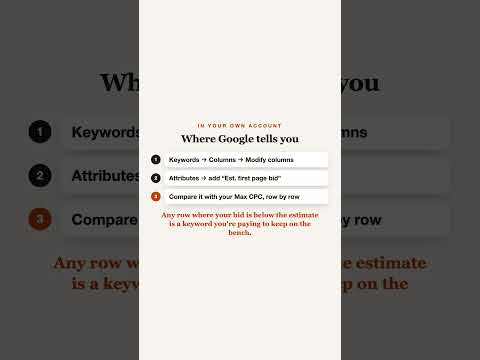
Keywords → columns → modify columns → attributes → add Est. first page bid and Est. top of page bid. Google computes both continuously and shows neither by default. Beside your Max CPC column, the diagnosis takes one glance: any row where your bid is below the first-page estimate may be losing visibility before budget becomes the constraint.
The status column sometimes says it outright: “Below first page bid”, but it is safer to compare the columns directly.
When to raise the bid, and when to leave it
If the estimate is close to the current bid and the search is valuable, test a modest increase above the estimate and watch impressions, conversions, and cost. The estimate moves, so matching it exactly is not a guarantee of first-page delivery.
If the estimate is far above the rest of the ad group, do not chase it automatically. Check the query’s intent, expected value, and landing-page fit first. Not every invisible keyword deserves rescue.
The three-line checklist
Add the two estimate columns
Keywords → columns → modify columns → attributes
Est. first page bid and Est. top of page bid, next to your Max CPC.
Sort by the gap
Your bid minus the first-page estimate. Negative rows are the invisible ones.
Raise the close ones, leave the wild ones
Test close gaps. Investigate large gaps before raising the bid. Check again in a month; estimates drift with the auction.
0 of 3 checked
Sources
- First page bid estimate: Definition: Google Ads Help
- Low search volume: Definition: Google Ads Help
Admiral compares each active keyword with its current first-page estimate on every sync and can file a bid change as an approval-ready proposal with undo attached.
Run the free audit